Muhammad Mehmood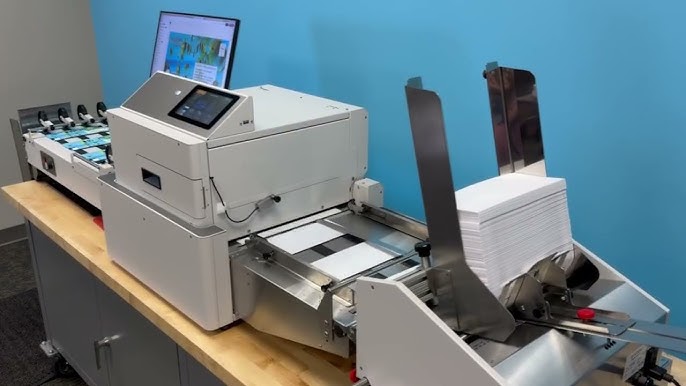
First impressions often begin before a letter is opened. Whether you’re sending invoices, invitations, marketing materials, or official business correspondence, a professionally printed envelope helps establish credibility and improves brand recognition. Understanding how an envelope printer works, what features matter, and how to prepare print-ready envelopes can save both time and money while delivering consistent results.
Many businesses still overlook envelope printing, relying on handwritten addresses or adhesive labels. While those methods may work for occasional mail, they become inefficient and inconsistent as mailing volumes increase. An envelope printer streamlines the process by producing clean, accurate, and professional-looking envelopes that reflect attention to detail.
What Is an Envelope Printer and Why Does It Matter?
An envelope printer is a specialized printing device designed to print directly onto envelopes of various sizes without requiring labels. These printers can handle different paper weights and envelope styles while maintaining proper alignment and print quality.
Unlike standard office printers that may struggle with thicker envelopes or unusual sizes, envelope printers are engineered to feed envelopes smoothly and reduce jams. This makes them suitable for businesses that regularly send customer communications, legal documents, financial statements, promotional mail, or event invitations.
Common users include:
- Law firms
- Healthcare providers
- Financial institutions
- Marketing agencies
- Educational organizations
- Small businesses
- E-commerce companies
Professional envelope printing creates a polished appearance while improving operational efficiency.
How to Choose the Right Envelope Printer
Selecting the right printer depends on your mailing volume, print quality expectations, and operational needs.
Step 1: Estimate Your Printing Volume
Start by determining how many envelopes you print each week or month.
A small office sending fewer than 100 envelopes weekly may only need a compact desktop model. Businesses handling several thousand envelopes each month should consider commercial-grade equipment with higher duty cycles.
Step 2: Verify Envelope Compatibility
Not every printer supports every envelope size.
Check whether the printer can handle common options such as:
- #10 business envelopes
- A2 invitation envelopes
- A6 greeting card envelopes
- Catalog envelopes
- Window envelopes
Flexible media handling reduces future limitations.
Step 3: Evaluate Print Quality
Business correspondence should appear crisp and professional.
Look for printers capable of producing sharp text, accurate logos, and consistent alignment. High-resolution output is particularly important for branding materials and return addresses.
Step 4: Consider Speed
Printing speed becomes important when preparing bulk mailings.
Instead of waiting hours for large batches, faster printers can significantly reduce production time while maintaining consistent quality.
Step 5: Review Operating Costs
The purchase price represents only part of the investment.
Compare:
- Ink or toner costs
- Maintenance requirements
- Replacement parts
- Energy consumption
- Expected lifespan
Lower operating costs often outweigh a lower initial purchase price over time.
Preparing Envelopes for Professional Printing
Even the best printer cannot compensate for poorly prepared designs.
Use Correct Margins
Leave adequate margins around all edges to avoid clipping during printing.
Choose Readable Fonts
Simple fonts improve readability and postal processing.
Avoid decorative typography for addresses.
Keep Branding Consistent
Use the same logo, colors, and typography found throughout your business materials to strengthen brand recognition.
Test Before Large Runs
Always print several sample envelopes before producing hundreds or thousands.
Testing helps identify:
- Alignment issues
- Color variations
- Text placement errors
- Envelope feeding problems
Correcting small issues early prevents expensive reprints.
Common Applications for Envelope Printing
Envelope printers support many day-to-day business activities.
Business Correspondence
Companies regularly print:
- Return addresses
- Recipient addresses
- Corporate logos
- Department identifiers
This creates a professional appearance while improving mailing efficiency.
Marketing Campaigns
Direct mail remains effective when personalized.
Printing names, addresses, promotional messages, or seasonal branding directly onto envelopes increases consistency and often improves recipient engagement.
Invitations and Events
Wedding planners, nonprofits, schools, and corporate event organizers frequently use envelope printers for invitations.
Printed envelopes provide a polished presentation that handwritten alternatives may not achieve at scale.
Financial Documents
Banks, accounting firms, and payroll providers often rely on printed envelopes to ensure accurate recipient information while maintaining a professional image.
Common Mistakes to Avoid
Many printing issues stem from simple oversights rather than equipment failure.
One frequent mistake is selecting the wrong envelope size in the printer settings. Even slight mismatches can result in shifted text or incomplete printing.
Another common problem is overloading the feed tray. While it may seem more efficient, excessive stacks can increase paper jams and inconsistent feeding.
Using poor-quality envelopes also causes trouble. Thin or uneven paper may wrinkle, absorb ink unevenly, or feed incorrectly through the printer.
Failing to clean rollers and perform routine maintenance gradually reduces print quality and increases downtime.
Finally, neglecting to proofread envelope information can create costly mailing errors. Incorrect addresses, outdated logos, or spelling mistakes can damage professionalism and require expensive reprints.
Expert Tips for Better Envelope Printing
Experienced print operators follow several best practices to maintain consistent results.
Store envelopes in a dry environment to prevent moisture from causing curling or feeding problems.
Print a small batch whenever switching envelope brands or sizes since different manufacturers may vary slightly in thickness and texture.
Maintain updated address databases to reduce returned mail and improve delivery accuracy.
Use templates for recurring mailings to ensure consistent formatting across departments.
Schedule routine maintenance according to manufacturer recommendations rather than waiting for problems to appear.
Finally, monitor ink or toner levels before beginning large production runs to avoid interruptions midway through important projects.
Improving Workflow with Envelope Printing
Organizations handling frequent mailings often benefit from integrating envelope printing into their overall document workflow.
For example, invoices generated by accounting software can be exported directly into mailing lists for envelope printing. Customer databases can also automate recipient information, reducing manual data entry and minimizing human error.
This streamlined approach saves time while improving consistency across large mailing campaigns.
Businesses that regularly communicate with customers also find it easier to maintain brand standards because every envelope follows the same design guidelines.
Conclusion
An envelope printer is more than just a specialized office device. It helps businesses create professional correspondence, improve operational efficiency, and maintain consistent branding across every mailing. Choosing the right equipment, preparing accurate print files, and following proven printing practices can significantly improve both quality and productivity.
Whether you’re printing a few dozen envelopes each week or managing large-scale mail campaigns, investing time in proper planning and best practices ensures reliable results that leave a positive first impression every time.